
Features

Every feature,
with the AI part spelled out

No vague “AI-powered” labels. Here is what each part of Family AI does and where AI comes in.

Voice-first tasks

Turn everyday conversation into actionable tasks. Speak naturally and Family AI captures what needs doing.

  • Natural speech, no fixed commands
  • One sentence can become several tasks
  • Hands-free while cooking, driving or out and about
  • Preview before anything is saved

AI's role: speech recognition plus a language model that extracts who, what and when.
AI assistant

Groups, prioritizes and suggests owners, so the right person gets the right task at the right time.

  • Auto-groups tasks: chores, kids, errands, shopping
  • Surfaces what matters most today
  • Suggests a fair split across the family
  • Fits tasks into each person's free time, based on the family routine

AI's role: suggestions only. You confirm or change every assignment.

Live family board

A real-time, color-coded board with drag-and-drop scheduling. Everyone sees the same picture.

  • Syncs instantly to every family member's device
  • Colors show who owns what and what's due
  • Drag and drop to reschedule
  • Weekly view to plan ahead

AI's role: none on the board itself, by design: it shows exactly what you approved.

Sign in with Microsoft

Secure sign-in with your existing Microsoft account. No new password to remember.

  • One-tap sign-in
  • Backed by Microsoft identity standards
  • We only request what the family board needs
  • Same account on phone, tablet and web

AI's role: none. Authentication is handled entirely by Microsoft.

Design

One consistent design on every screen

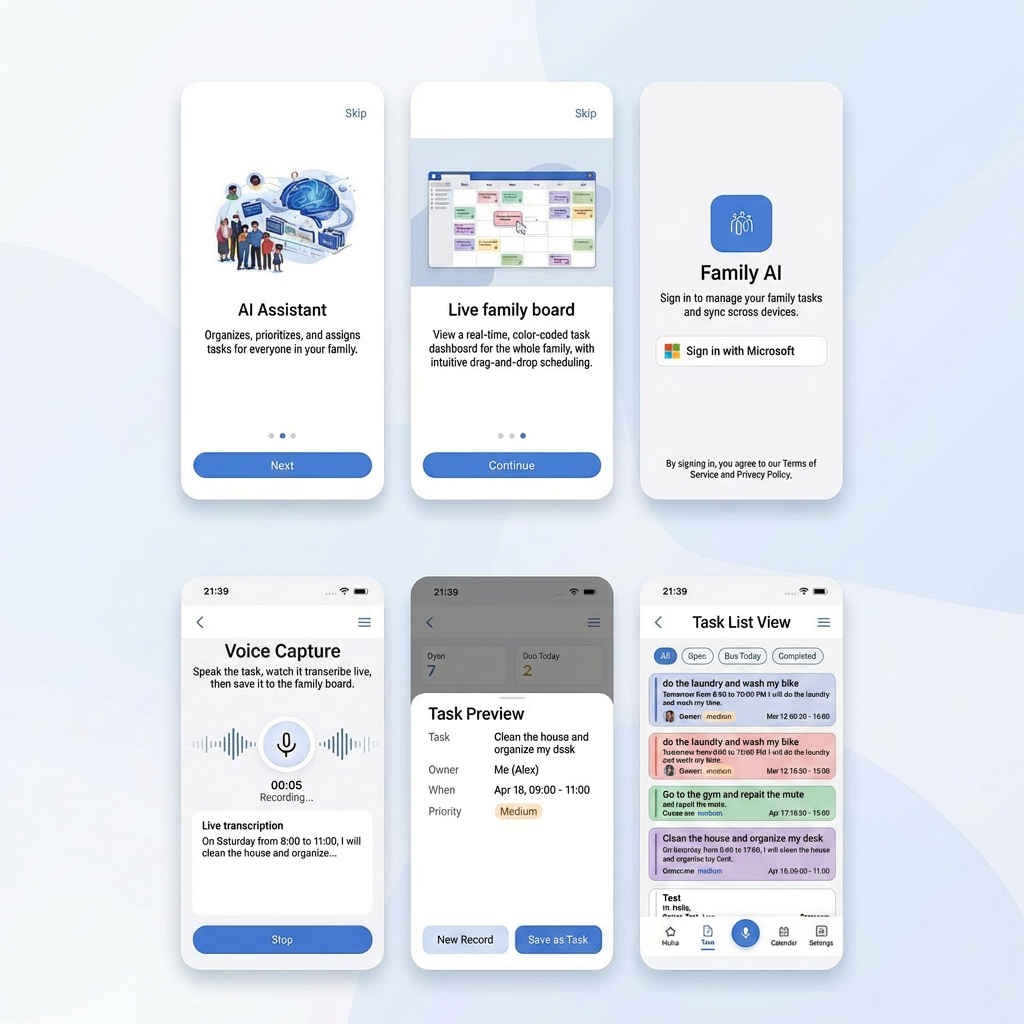
Shared typography, colors and components from onboarding and sign-in to voice capture, task preview and the task list.

Designed with Claude Design. Learn more

Family AI design system: onboarding, sign-in, voice capture, task preview and task list screens
Pricing

Simple plans, no hidden fees

Planned pricing at launch. It may change before release; waitlist families will hear first.

Free

$0/month
  • Basic task management
  • Voice tasks
  • Up to 3 family members
  • Basic reminders
  • AI smart suggestions
Join the waitlist

Family Plus

$19.99/month
  • Everything in Pro
  • Multiple homes
  • Unlimited devices
  • Priority support from the dev team
  • Advanced family insights
Join the waitlist
FAQ

Questions families ask us most

Does the AI assign tasks on its own?
No. AI only drafts tasks and suggests who should do them. Everything appears on a preview screen first; a task reaches the family board only after someone confirms it.
What exactly does the AI do?
Four things: turns speech into text, splits a sentence into structured tasks (who, what, when, repeat), suggests grouping, priority and owners, and learns good reminder times from how your family completes tasks.
Is my family's data safe?
Data is stored on Google Cloud and encrypted in transit and at rest. It is used only to run your family board and improve your own suggestions. We never sell it or use it for advertising.
Which devices will Family AI support?
Family AI is designed for phones (iOS and Android) and the web. The official device list will be announced at launch.
How many family members can I add?
The Free plan supports up to 3 members. Pro and Family Plus have no member limit.
Who is behind Family AI?
Family AI is built and operated by Thiện Quang Technologies Co., Ltd., an engineering company in Ho Chi Minh City specializing in Cloud, AI and software. Visit thienquangtech.com to learn more.
How does AI use our daily routine?
You enter rough times for waking up, work, school and bed. AI combines that with when tasks usually get done to suggest the right moment and person for each task, with a reason attached. It never assigns anything on its own, and you can turn routine-based suggestions off for any family member.

Want your family to try it
before launch?

Join the waitlist. We're inviting the first families to try Family AI and we'll listen to your feedback directly to shape the product.